
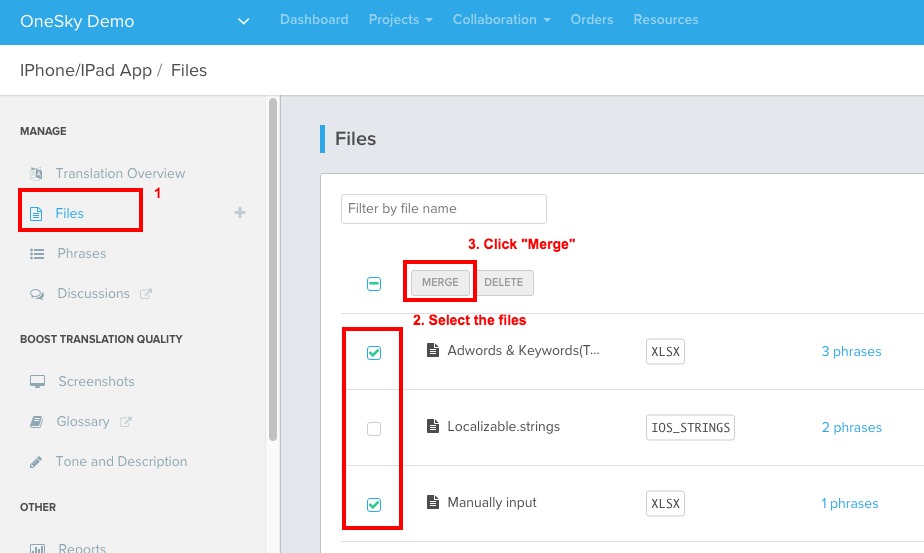
1. Go to "Files"
2. Select the files that you would like to combine
3. Click the "MERGE" button on the top
- Merging files is non-reversible. The files cannot be re-separated after that.
- Before merging the files, please make sure that all strings have unique string IDs, otherwise one will replace the other, despite having different content.
Comments
4 comments
Why not just use the Stream.CopyTo(Stream destination) method?
FaceTime
This article is really amazing i hope we will see again this type of article in future. This information is really helpful for Kynect who really needs this. I hope you will many more write post like this. That's great. I was impressed by your writing. I am happy to see such a topic. Please come to my blog and read it.
Can you please guide me further on how to change the File name after merging?
PolyTrack
The OneSky plugin for IntelliJ IDEA and Android Studio streamlines the translation process for mobile apps by allowing developers to upload and retrieve localized strings directly within the IDE, eliminating the need to switch platforms. Just as users appreciate having easy access to the heavy hauling services for quick decision-making, developers benefit from tools like OneSky that make localization as smooth and efficient as possible.
Please sign in to leave a comment.