
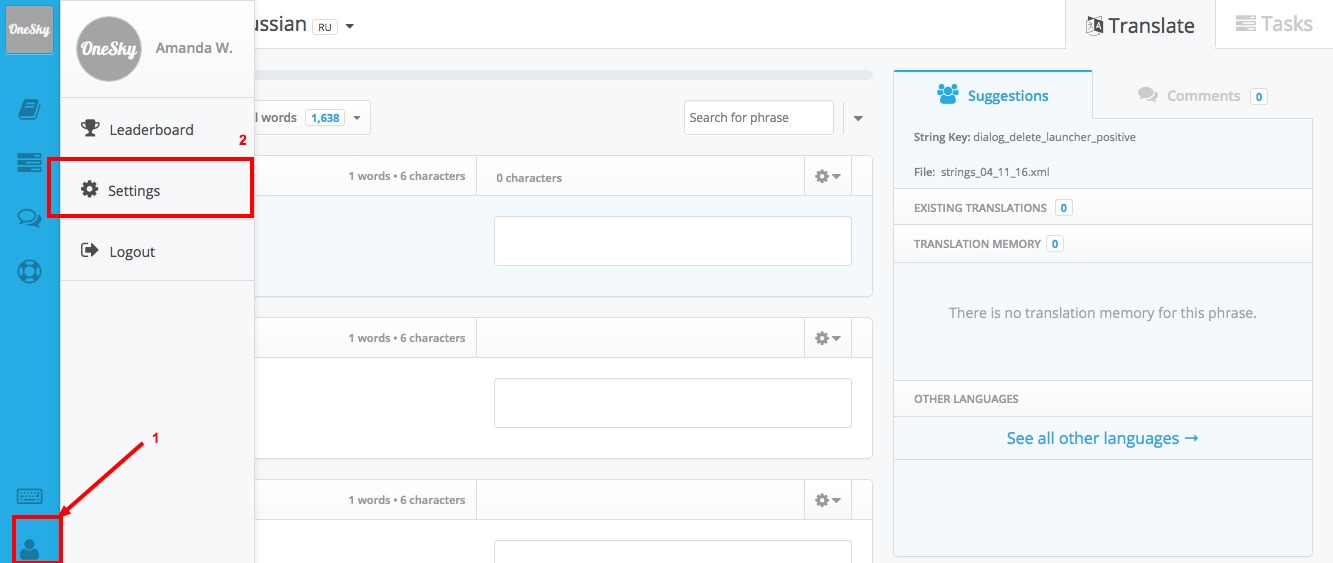
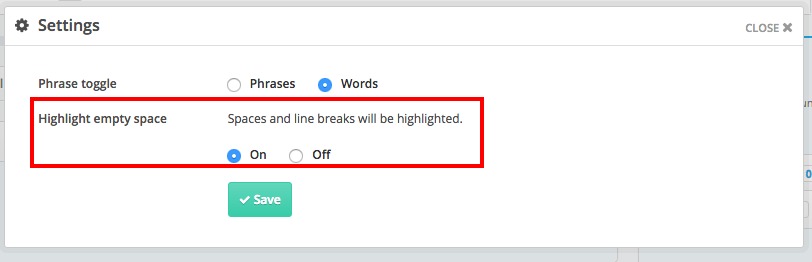
In order to view spaces and line breaks more easily, you can choose to highlight spaces and line breaks in the source text. To enable this settings,
1. Click the user icon at the left hand sidebar inside the translation tool view
2. Go to "Settings"
3. Select "On" for "Highlight empty space"
Comments
6 comments
That was so amazing.
TellTims Survey Code
The Team will count a placeholder as one word to compensate the effort of translators to take care of them. Same concept applies to HTML tags or any words or numbers that need not to be translated like anime world download apk.
The Team will count a placeholder as one word to compensate the effort of translators to take care of them. Same concept applies to HTML tags or any words or numbers that need not to be translated like download apkguide apps.
Locksmith course Leicester:
The Team will count a placeholder as one word to compensate the effort of translators to take care of them. Same concept applies to HTML tags or any words or numbers that need not to be translated like.
Our Team will count a placeholder as one word to compensate the effort of translators to take care of them. Same concept applies to HTML tags or any words or numbers that need not to be translated like Kamaikendra Android App Download.
Great post! Highlighting spaces and line breaks in source text is super helpful, especially when editing subtitle files or scripts for apps like Anime World APK. If you're working on custom anime subtitles or syncing issues, clean source text formatting can make a big difference. Thanks for the tips!
Please sign in to leave a comment.